
7.5 KiB
MotionCal
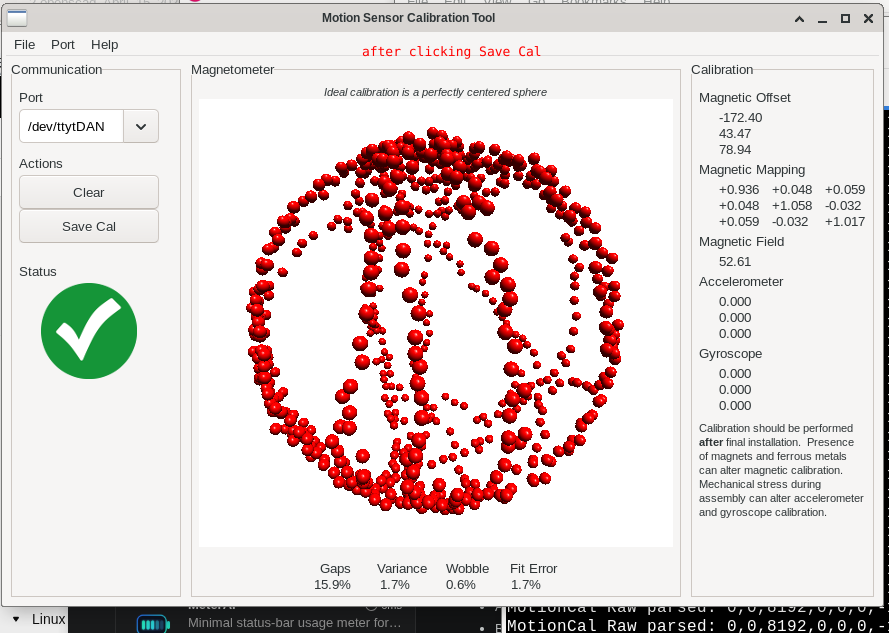
MotionCal is a desktop magnetometer calibration utility originally written by Paul Stoffregen. This fork is maintained at:
https://salemdata.net/repo/jlpoole/MotionCal
Paul's upstream source:
https://github.com/PaulStoffregen/MotionCal
The application reads IMU-style serial data, builds a 3D magnetometer point cloud, and estimates magnetic calibration parameters:
hard iron offset       magnetic_offset_uT
soft iron correction   magnetic_mapping_matrix
field strength         magnetic_field_uT
This fork is being used with a LilyGO T-Beam Supreme / QMC6310 bridge firmware that streams MotionCal-compatible Raw: lines over USB serial.
What MotionCal Produces
A saved calibration file contains values like:
magnetic_offset_uT=-172.96843,43.0260162,78.8941956
magnetic_field_uT=52.4668198
magnetic_mapping_matrix=
  0.943139076 0.0439298451 0.0595370531
  0.0439298451 1.04979992 -0.0347476006
  0.0595370531 -0.0347476006 1.01706612
The hard-iron offset moves the center of the magnetometer cloud back to zero. The soft-iron matrix transforms an ellipsoid-shaped cloud back toward a sphere.
The correction model is:
mag_uT = raw_motioncal_counts * 0.1
centered = mag_uT - magnetic_offset_uT
corrected = magnetic_mapping_matrix * centered
Serial Input Format
MotionCal expects ASCII serial lines like this:
Raw:accel_x,accel_y,accel_z,gyro_x,gyro_y,gyro_z,mag_x,mag_y,mag_z
The T-Beam bridge firmware currently sends placeholder accelerometer and gyro values, plus live magnetometer readings:
Raw:0,0,8192,0,0,0,mag_x,mag_y,mag_z
Example:
Raw:0,0,8192,0,0,0,-1578,447,1266
For this workflow, the magnetometer values are MotionCal integer counts:
1 count = 0.1 microtesla
uT = counts * 0.1
These are not the QMC sensor's original register counts. The T-Beam bridge reads SensorLib Gauss values, converts Gauss to microtesla, then converts microtesla to MotionCal counts.
T-Beam Bridge Firmware
The companion firmware project lives at:
/usr/local/src/microReticulumTbeam/exercises/25_motioncal_tbeam
Typical bridge workflow:
source /home/jlpoole/pioenv/bin/activate
cd /usr/local/src/microReticulumTbeam/exercises/25_motioncal_tbeam
pio run -e dan -t upload
pio device monitor -b 115200 --port /dev/ttytDAN
Close the serial monitor before opening the same port in MotionCal.
Build On Linux
MotionCal uses wxWidgets and OpenGL. On this system, the working build command is:
cd /usr/local/src/MotionCal
make WXCONFIG=wx-config LDFLAGS="-lglut -lGLU -lGL -lm"
If the linker cannot find OpenGL/GLUT libraries, install the development packages for wxWidgets, OpenGL, GLU, and freeglut using your distribution's package manager.
The Makefile default references a local wxWidgets path:
WXCONFIG = ~/wxwidgets/3.0.2.gtk2-opengl/bin/wx-config
Overriding WXCONFIG=wx-config on the make command line uses the system wxWidgets configuration instead.
Run
Run the GUI with:
cd /usr/local/src/MotionCal
./MotionCal
Then select the T-Beam USB serial port in the MotionCal window.
To include a manually-created PTY, such as a socat split stream, pass it with --port:
./MotionCal --port /tmp/ttyMotionCal
The port will appear in the Port menu and the Port dropdown even if it is not discovered by MotionCal's automatic /dev/tty* scan.
If running under Wayland and the GUI has trouble starting or rendering, GDK_BACKEND=x11 forces the wx/GTK path through X11 compatibility.
cd /usr/local/src/MotionCal
GDK_BACKEND=x11 ./MotionCal --port /tmp/ttyMotionCal
Calibration Procedure
- Flash and start the T-Beam bridge firmware.
- Confirm the serial stream contains
Raw:lines. - Close any terminal monitor using the serial port.
- Start MotionCal.
- Select the T-Beam serial port.
- Rotate the board through as many 3D orientations as possible.
- Continue until the point cloud has good sphere coverage and fit metrics are stable.
- Save the calibration settings from MotionCal.
Good calibration requires broad 3D motion. Do not only rotate the board flat on a table. Roll, pitch, yaw, invert, and sweep through orientations so the cloud fills the sphere.
Saved Settings Files
This fork includes a modified save path that writes calibration settings to timestamped text files such as:
MotionCal_settings_20260425_114546.txt
MotionCal_KitchenMagnet_settings_20260426_080729.txt
Saved files include:
valid_points
fit_error_percent
surface_gap_error_percent
magnitude_variance_error_percent
wobble_error_percent
magnetic_offset_uT
magnetic_field_uT
magnetic_mapping_matrix
cal1_echo_line
cal2_echo_line
raw_points
The raw_points section is useful for later analysis because it preserves the magnetometer point cloud that produced the calibration.
Calibration Packet Echo
MotionCal can send a 68-byte calibration packet back to the device. The T-Beam bridge accepts that packet and echoes human-readable values:
Cal1:...
Cal2:...
The Cal1 line contains hard-iron offsets and field strength. The Cal2 line contains the 3x3 soft-iron mapping matrix.
Interpreting Hard And Soft Iron
Hard iron is a fixed magnetic bias. It shifts the center of the point cloud.
Soft iron is field distortion. It stretches, squashes, shears, or rotates the cloud into an ellipsoid. MotionCal estimates an inverse soft-iron matrix that maps the ellipsoid back toward a sphere.
A matrix close to identity means small soft-iron distortion:
1 0 0
0 1 0
0 0 1
Example modest soft-iron correction:
0.9431  0.0439  0.0595
0.0439  1.0498 -0.0347
0.0595 -0.0347  1.0171
Troubleshooting
If MotionCal does not show incoming points:
Confirm the correct serial port is selected.
Confirm the device is streaming at 115200 baud.
Confirm the stream contains Raw: lines.
Close pio device monitor before opening the port in MotionCal.
If calibration values appear 10x different from a notebook or script:
MotionCal saved offsets are in microtesla.
The Raw: magnetometer values are MotionCal counts.
Convert counts to uT with: uT = counts * 0.1
If the fit is poor:
Collect more orientations.
Keep the board away from steel, magnets, speakers, motors, and high-current wiring.
Try the calibration in a different physical location.
Watch for read_fail or overflow messages from the bridge firmware.
If MotionCal crashes after a long run with Mesa or AMDGPU allocation errors:
MotionCal's magnetometer sample buffer is bounded at 650 points, so it is not
intended to grow without limit. Errors such as "MESA: error: amdgpu: failed to
allocate ... from the 32-bit address space" point to the OpenGL/Mesa rendering
stack rather than the calibration data buffer.

Save calibration once the fit is stable, then restart MotionCal for another run.
Avoid running multiple OpenGL-heavy viewers at the same time if this reproduces.
For troubleshooting, try software rendering:

LIBGL_ALWAYS_SOFTWARE=1 GDK_BACKEND=x11 ./MotionCal --port /tmp/ttyMotionCal
Repository Notes
The upstream project did not include a README at the time this fork was created. This document records the local build workflow and the T-Beam/QMC6310 calibration workflow used with this fork.
Generated build outputs such as MotionCal, imuread, *.o, debug logs, and timestamped calibration captures are local artifacts unless intentionally committed for documentation.