<h1>Where, oh where, is the current Reticulum source of truth?</h1>
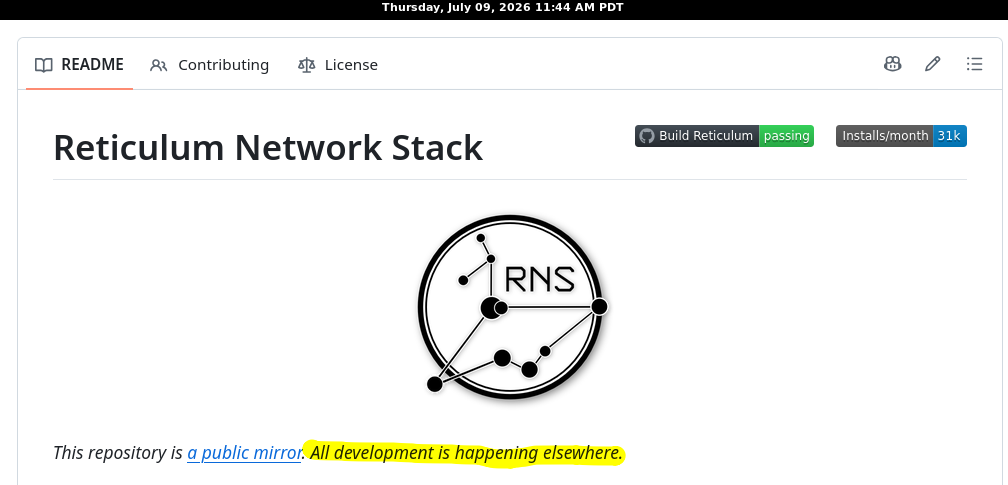
<p>Currently the Reticulum protocol is accepted as defined within the Python code implementation created by Mark Qvist. There is no formal specification for the Reticulum protocol. Hence the protocol is derived from Mark’s Python source tree. The question I faced: where can I obtain the current high watermark of the implementation? Mark’s GitHub page states development is “happening elsewhere.”</p>
<img class=" wp-image-1060" src="https://salemdata.net/johnpress/wp-content/uploads/2026/07/20260709_114344_Thu.png" alt="" width="530" height="255" /> GitHub markqvist/Reticulum Project README.md
<p>As of 10:00 AM, Thursday, July 9, 2026, the source of truth among the releases varies.</p>
<h2>Releases As Of 7/8/26</h2>
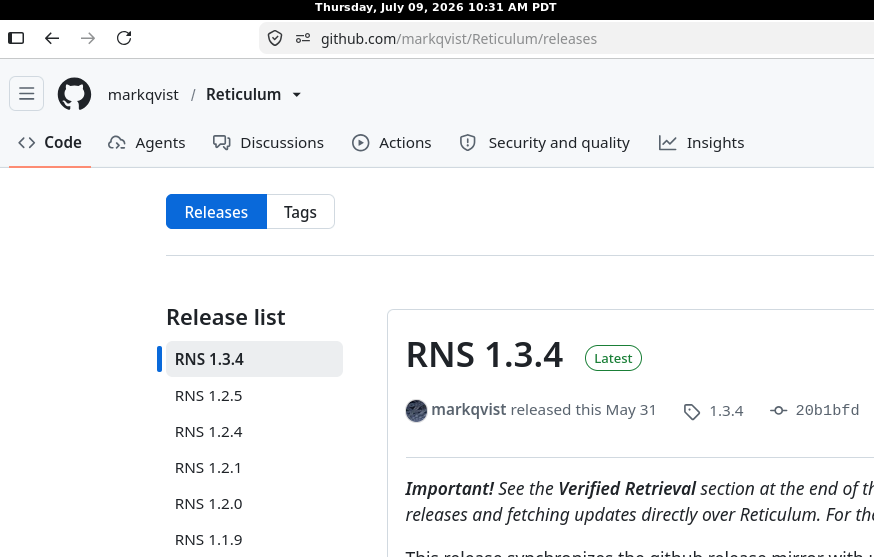
<p>GitHub is 1.3.4</p>
<p> </p>
<img class="size-full wp-image-1058" src="https://salemdata.net/johnpress/wp-content/uploads/2026/07/20260709_103138_Thu.png" alt="" width="874" height="557" /> GitHub for project markqvist/Reticulum
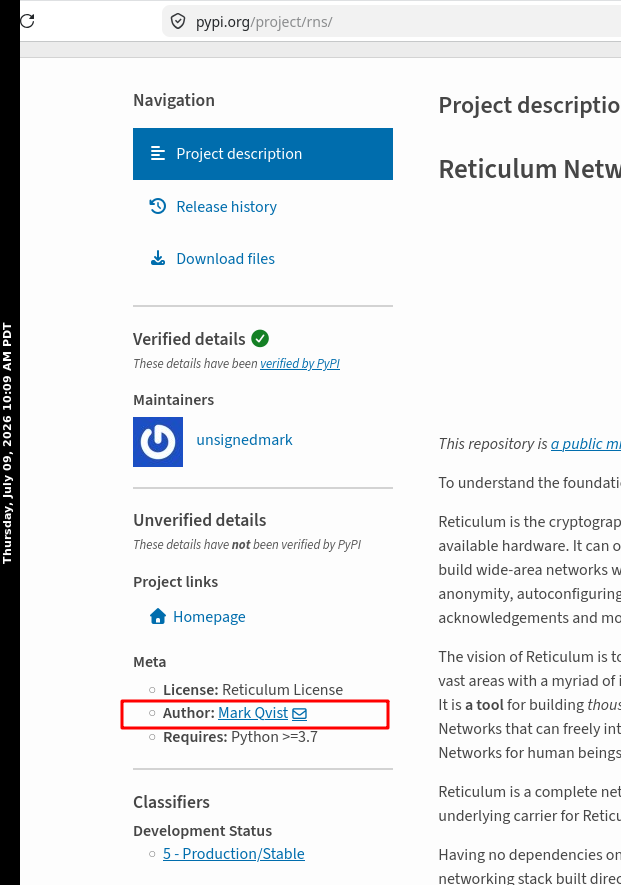
<p>The PyPI [Python Package Installer] page for rns is: 1.3.7</p>
<p> </p>
<img class="size-full wp-image-1057" src="https://salemdata.net/johnpress/wp-content/uploads/2026/07/20260709_100829_Thu.png" alt="" width="621" height="885" /> pypi.org project page for rns
<p>I use Chad Attermann’s <a href="https://github.com/attermann/microReticulum">microReticulum</a> project which is written in C++ and can be loaded onto a Lilygo T-Beam SUPREME. Chad’s project relies upon the GitHub release, currently at 1.3.4. (See https://github.com/attermann/microReticulum/issues/68 “Reticulum: Source of Truth #68”.) If I am going to make the investment of time to bring my testing harness up to the high watermark, I’d prefer I be at 1.3.7 so I can assume I do not have to keep following the high watermark.</p>
<h1>Fetching the definitive source of truth</h1>
<p>With ChatGPT’s help searching the varied sources, I came up with this method to fetch from Mark Qvist his current release using his rnsgit tool. (The riddle, of course, is knowing the correct reticulum address which can change or become inactive. Rather that pour through the various forums, many of which become stale, I relied on ChatGPT to search for me.) The command that finally resolved the ambiguity was:</p>
<pre>rngit release rns://7649a50d84610232d1416b41d2896aff/reticulum/reticulum \
fetch latest:all \
–signer bc7291552be7a58f361522990465165c</pre>
<p><em>Caution</em>: the above does not create a protocol specification. It only identifies the current signed implementation release I was able to retrieve over Reticulum as of the date shown.</p>
<h3>Recipe</h3>
<p>1) Install a dedicated Python virtual environment for Reticulum; all command hereafter <em>assume you are operating within such an isolated environment</em>.</p>
<p>2) Verify which version of rns you have:</p>
<pre>python3 -m pip show rns
Name: rns
Version: 1.3.7
Summary: Self-configuring, encrypted and resilient mesh networking stack for LoRa, packet radio, WiFi and everything in between
Home-page: https://reticulum.network/
Author: Mark Qvist
Author-email: mark@unsigned.io
License: Reticulum License
Location: /home/jlpoole/rnsenv/lib/python3.13/site-packages
Requires: cryptography, pyserial
Required-by: lxmf, lxst, nomadnet, sbapp
[ rnsenv|script ] jlpoole@jp ~/tmp/reticulum-rngit-fetch</pre>
<p>3) If your rns version does not match, I found upgrading with pip did not take me from 1.3.4 to 1.3.7; I had to remove version 1.3.4 and then install anew:</p>
<p>pip install rns</p>
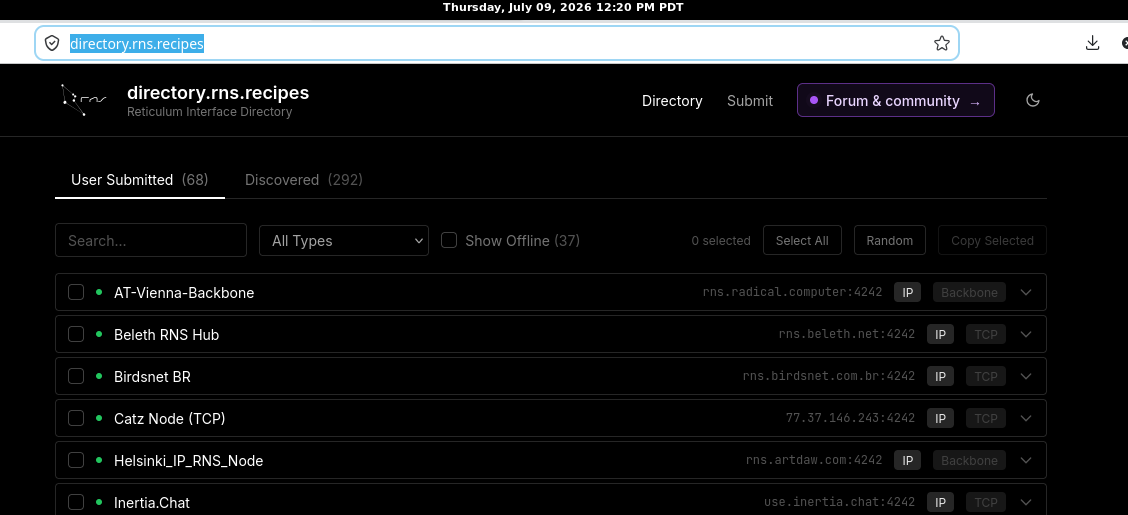
<img class=" wp-image-1061" src="https://salemdata.net/johnpress/wp-content/uploads/2026/07/20260709_122035_Thu.png" alt="" width="694" height="317" /> directory.rns.recipes/
<p>4) Edit your rns configuration file, ~/.reticulum/config, to point to some <em>active</em> rns servers. A list of active servers may be accessed at: https://directory.rns.recipes/</p>
<p> </p>
<pre>[interfaces]</pre>
<pre>[[RNS Sideband]]
type = TCPClientInterface
enabled = yes
target_host = sideband.connect.reticulum.network
target_port = 7822
[[Beleth RNS Hub]]
type = TCPClientInterface
enabled = yes
target_host = rns.beleth.net
target_port = 4242
[[RMAP]]
type = TCPClientInterface
enabled = yes
target_host = rmap.world
target_port = 4242
[[Nexus Backbone PH]]
type = TCPClientInterface
enabled = yes
target_host = 212.227.208.95
target_port = 4242</pre>
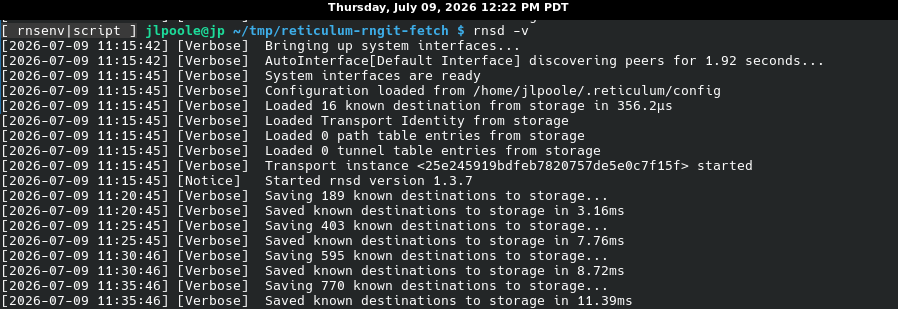
<p>5) Start your rns daemon in its own console (within your virtual Python environment):</p>
<pre> rnsd -v</pre>
<img class="size-full wp-image-1062" src="https://salemdata.net/johnpress/wp-content/uploads/2026/07/20260709_122234_Thu.png" alt="" width="898" height="309" /> rns daemon
<p>6) In another console (within your virtual Python environment), test if you can “rnpath” (similar to ping) the address:</p>
<pre>(rnsenv) jlpoole@jp ~/tmp/reticulum-rngit-fetch $ rnpath 7649a50d84610232d1416b41d2896aff
Path found, destination <7649a50d84610232d1416b41d2896aff> is 5 hops away via <521c87a83afb8f29e4455e77930b973b> on TCPInterface[RNS Sideband/sideband.connect.reticulum.network:7822]
(rnsenv) jlpoole@jp ~/tmp/reticulum-rngit-fetch $ date
Thu Jul 9 11:16:17 PDT 2026
(rnsenv) jlpoole@jp ~/tmp/reticulum-rngit-fetch $</pre>
<p>Assuming you successfully resolved the path, you can use the tool <strong>rnsgit</strong></p>
<pre>rngit release rns://7649a50d84610232d1416b41d2896aff/reticulum/reticulum \
fetch latest:all \
–signer bc7291552be7a58f361522990465165c</pre>
<p>Here’s my fetch attempt and the results:</p>
<pre>(rnsenv) jlpoole@jp ~/tmp/reticulum-rngit-fetch $ rngit release rns://7649a50d84610232d1416b41d2896aff/reticulum/reticulum \
fetch latest:all \
–signer bc7291552be7a58f361522990465165c
Transferring manifest.rsm: 100% (3.76 KB)
Release manifest validated, signed by <bc7291552be7a58f361522990465165c>
Fetching 5 artifacts…
Transferring rns-1.3.7.tar.gz: 100% (516.65 KB)
Transferring rns-1.3.7-py3-none-any.whl: 100% (603.49 KB)
Transferring rnspure-1.3.7-py3-none-any.whl: 100% (603.62 KB)
Transferring Reticulum Manual.epub: 100% (4.07 MB)
Transferring Reticulum Manual.pdf: 100% (5.03 MB)
(rnsenv) jlpoole@jp ~/tmp/reticulum-rngit-fetch $ ls -la
total 13864
drwxr-xr-x 2 jlpoole jlpoole 4096 Jul 9 11:17 .
drwxr-xr-x 5 jlpoole jlpoole 4096 Jul 9 10:55 ..
-rw-r–r– 1 jlpoole jlpoole 4072754 Jul 9 11:17 'Reticulum Manual.epub'
-rw-r–r– 1 jlpoole jlpoole 5029143 Jul 9 11:17 'Reticulum Manual.pdf'
-rw-r–r– 1 jlpoole jlpoole 603491 Jul 9 11:16 rns-1.3.7-py3-none-any.whl
-rw-r–r– 1 jlpoole jlpoole 516648 Jul 9 11:16 rns-1.3.7.tar.gz
-rw-r–r– 1 jlpoole jlpoole 3763 Jul 9 11:16 rns_1.3.7.rsm
-rw-r–r– 1 jlpoole jlpoole 603624 Jul 9 11:16 rnspure-1.3.7-py3-none-any.whl
(rnsenv) jlpoole@jp ~/tmp/reticulum-rngit-fetch $</pre>
<p>Here’s what is in the rns-1.3.7.tar.gz</p>
<pre>(rnsenv) jlpoole@jp ~/tmp/reticulum-rngit-fetch_20260709_1117 $ mkdir -p ~/tmp/rns-1.3.7_src_20260709_1117
tar -xzf rns-1.3.7.tar.gz -C ~/tmp/rns-1.3.7_src_20260709_1117 –strip-components=1
cd ~/tmp/rns-1.3.7_src_20260709_1117
find . -maxdepth 2 -type f | sort | less
(rnsenv) jlpoole@jp ~/tmp/rns-1.3.7_src_20260709_1117 $ find . -maxdepth 2 -type f | sort
./CRNS/__init__.py
./PKG-INFO
./README.md
./RNS/Buffer.py
./RNS/Channel.py
./RNS/Destination.py
./RNS/Discovery.py
./RNS/Identity.py
./RNS/Link.py
./RNS/Packet.py
./RNS/Resolver.py
./RNS/Resource.py
./RNS/Reticulum.py
./RNS/Transport.py
./RNS/__init__.py
./RNS/_version.py
./rns.egg-info/PKG-INFO
./rns.egg-info/SOURCES.txt
./rns.egg-info/dependency_links.txt
./rns.egg-info/entry_points.txt
./rns.egg-info/requires.txt
./rns.egg-info/top_level.txt
./setup.cfg
./setup.py
(rnsenv) jlpoole@jp ~/tmp/rns-1.3.7_src_20260709_1117 $</pre>
<h2>Conclusion</h2>
<p>For my purposes, the signed RNS-distributed release is the best practical source of truth. GitHub is still useful for history, issue discussion, and derivative projects, but the current implementation watermark appears to be the signed release retrievable over Reticulum itself.</p>
Where, oh where, is the current Reticulum source of truth?
Currently the Reticulum protocol is accepted as defined within the Python code implementation created by Mark Qvist. There is no formal specification for the Reticulum protocol. Hence the protocol is derived from Mark’s Python source tree. The question I faced: where can I obtain the current high watermark of the implementation? Mark’s GitHub page states development is “happening elsewhere.”
GitHub markqvist/Reticulum Project README.md
As of 10:00 AM, Thursday, July 9, 2026, the source of truth among the releases varies.
Releases As Of 7/8/26
GitHub is 1.3.4
GitHub for project markqvist/Reticulum
The PyPI [Python Package Installer] page for rns is: 1.3.7
pypi.org project page for rns
I use Chad Attermann’s microReticulum project which is written in C++ and can be loaded onto a Lilygo T-Beam SUPREME. Chad’s project relies upon the GitHub release, currently at 1.3.4. (See https://github.com/attermann/microReticulum/issues/68 “Reticulum: Source of Truth #68”.) If I am going to make the investment of time to bring my testing harness up to the high watermark, I’d prefer I be at 1.3.7 so I can assume I do not have to keep following the high watermark.
Fetching the definitive source of truth
With ChatGPT’s help searching the varied sources, I came up with this method to fetch from Mark Qvist his current release using his rnsgit tool. (The riddle, of course, is knowing the correct reticulum address which can change or become inactive. Rather that pour through the various forums, many of which become stale, I relied on ChatGPT to search for me.) The command that finally resolved the ambiguity was:
Caution: the above does not create a protocol specification. It only identifies the current signed implementation release I was able to retrieve over Reticulum as of the date shown.
Recipe
1) Install a dedicated Python virtual environment for Reticulum; all command hereafter assume you are operating within such an isolated environment.
2) Verify which version of rns you have:
python3 -m pip show rns
Name: rns
Version: 1.3.7
Summary: Self-configuring, encrypted and resilient mesh networking stack for LoRa, packet radio, WiFi and everything in between
Home-page: https://reticulum.network/
Author: Mark Qvist
Author-email: mark@unsigned.io
License: Reticulum License
Location: /home/jlpoole/rnsenv/lib/python3.13/site-packages
Requires: cryptography, pyserial
Required-by: lxmf, lxst, nomadnet, sbapp
[ rnsenv|script ] jlpoole@jp ~/tmp/reticulum-rngit-fetch
3) If your rns version does not match, I found upgrading with pip did not take me from 1.3.4 to 1.3.7; I had to remove version 1.3.4 and then install anew:
pip install rns
directory.rns.recipes/
4) Edit your rns configuration file, ~/.reticulum/config, to point to some active rns servers. A list of active servers may be accessed at: https://directory.rns.recipes/
For my purposes, the signed RNS-distributed release is the best practical source of truth. GitHub is still useful for history, issue discussion, and derivative projects, but the current implementation watermark appears to be the signed release retrievable over Reticulum itself.
Leave a Reply