<h2>Introduction</h2>
<p>If you migrated from Windows to Linux and stopped using an otherwise serviceable Brother P-Touch printer because Brother supplies no current Linux software, there may be a solution.</p>
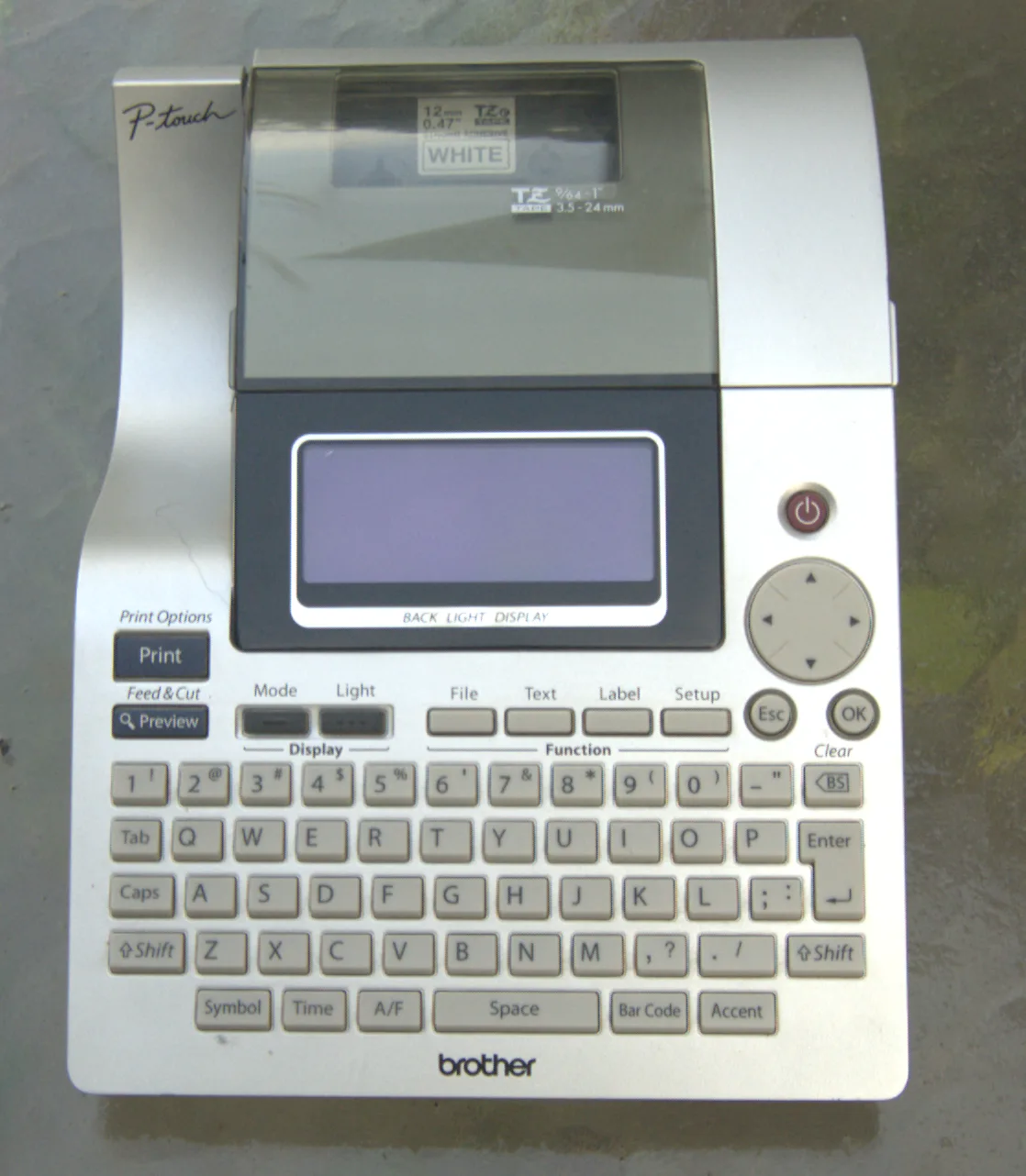
<p>I have a Brother P-Touch label printer which makes excellent labels. The problem is that for this model (# 2700/2710 – 10+ years old), Brother does not have software that will run on Linux. When I migrated from Windows 7 to Gentoo Linux as my standard desktop, the use of my P-Touch was only if I manually entered on the P-Touch’s keyboard, or I rebooted back to Windows just so I could use the P-Touch through its software. I asked ChatGPT what my options for Linux were and it concluded I was straight out of luck. Sad was I.</p>
<img class=" wp-image-1096" src="https://salemdata.net/johnpress/wp-content/uploads/2026/07/DSC_8474.webp" alt="" width="530" height="608" /> Brother PT-2700/2710 Label Printer
<p> </p>
<h2>Gentoo Linux Console</h2>
<p>A year later, I wondered if ChatGPT may be behind the times, so I consulted with Google search. I found <a href="https://arnowelzel.de/en/about-me">Arno Welzel</a>‘s page:<a href="https://arnowelzel.de/en/how-to-use-a-brother-p-touch-label-printer-in-linux"> How to use a Brother P-Touch label printer in Linux</a> Arno’s page, in turn acknowledged the problem was solved by Dominic Radermacher at: <a href="https://dominic.familie-radermacher.ch/projekte/ptouch-print/">P-Touch Label Drucker mit Linux benutzen</a></p>
<p>Arno has a fork staged at: https://codeberg.org/askaaron/ptouch-print.git</p>
<p>Anxious and elated was I that there was a solution, I downloaded Radermacher’s code, compiled it and it ran successfully allowing me to print to my P-Touch.</p>
<p>It requires command lines such as:</p>
<pre>./ptouch-print –font-size=12 –align=c –chain -c –text " Wire Nuts\n Caps "
./ptouch-print –font-size=16 –align=c –chain -c –text " Headers "
./ptouch-print –font-size=24 –align=c –chain -c –text " Microphones "</pre>
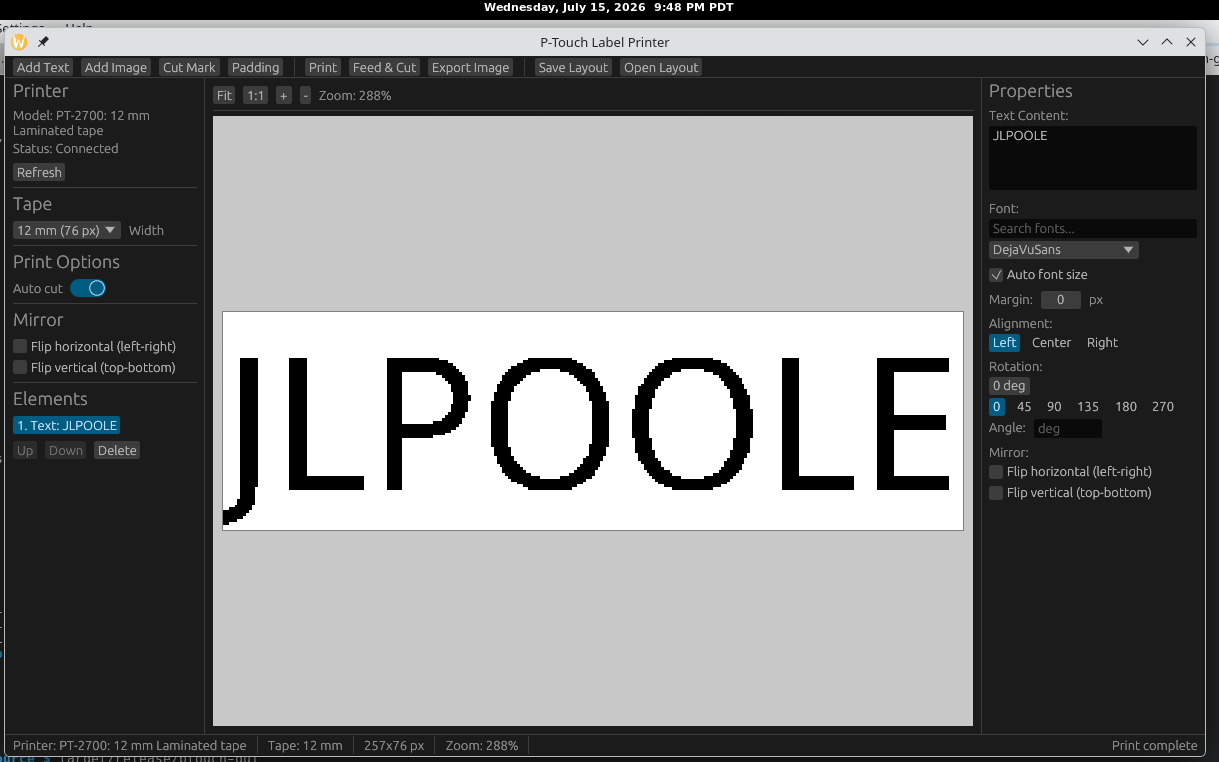
<p>But, as my hero <a href="https://www.youtube.com/@AndreasSpiess">Andreas Spiess</a> (the man with the Swiss accent) taught me, “we want more.” Then with ChatGPT, I discovered Huang Rui [GitHub user: <a href="https://github.com/vowstar">vowstar</a>]Rust based project: <a href="https://github.com/vowstar/ptouch-rs">ptouch-rs</a>. ptouch-rs has a full graphical user interface that reminds me of Brother’s Windows interface. I staged the project on my Gentoo workstation and successfully built it. It took less than 6 minutes; there were over 500 crates. My workstation is an Intel processor, vintage 2012, with 24 GB RAM.</p>
<p> </p>
<img class=" wp-image-1097" src="https://salemdata.net/johnpress/wp-content/uploads/2026/07/20260715_214804_Wed.png" alt="" width="421" height="263" /> ptouch-rs Graphical Interface on Intel workstation
<h2>Raspberry Pi (Trixie)</h2>
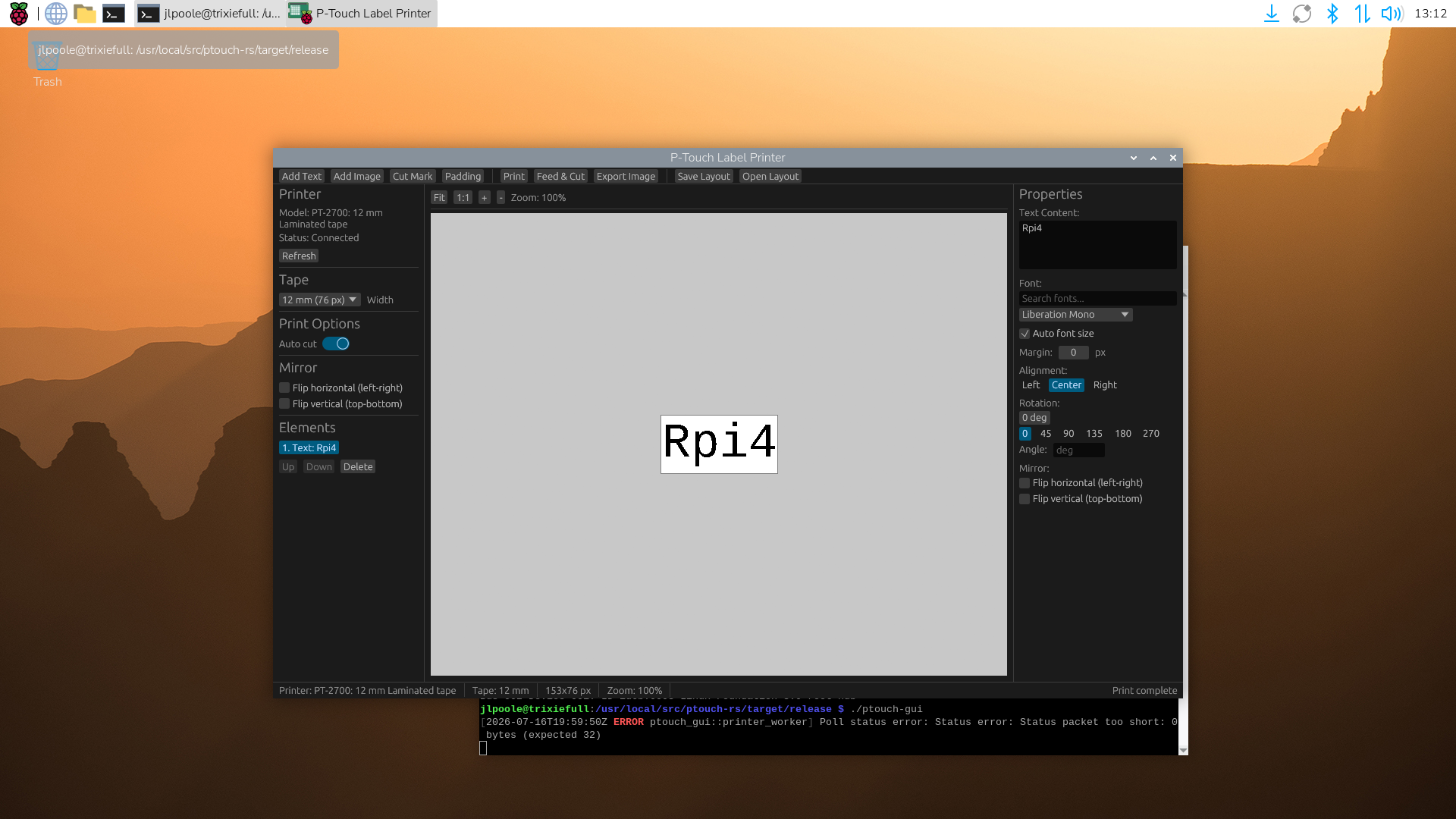
<p>The next question I had: will it compile and run on a Raspberry Pi? Answer: <strong>Yes</strong>… on Raspberry Pi OS (Debian 13 “Trixie”). I had to modify the code for <em>a clean build</em> and submitted to the developer <a href="https://github.com/vowstar/ptouch-rs/pull/9">Use Glow renderer for Raspberry Pi 4 compatibility</a> and <a href="https://github.com/vowstar/ptouch-rs/pull/8">Explicitly type Stroke width as f32</a>. Building on a Raspberry Pi 4B with 8 GB ram, it took about 30 minutes to compile.</p>
<img class=" wp-image-1100" src="https://salemdata.net/johnpress/wp-content/uploads/2026/07/20260716_13h12m19s_grim.png" alt="" width="445" height="250" /> Raspberry Pi Desktop with ptouch-rs Interface
<h2>Conclusion</h2>
<p>My Brother PT-2700/2710 now works from Linux through either the command-line <strong>ptouch-print</strong> utility or the nifty graphical <strong>ptouch-rs</strong> application. Other Brother P-Touch owners who abandoned Windows may find that their printers are supported as well.</p>
Introduction
If you migrated from Windows to Linux and stopped using an otherwise serviceable Brother P-Touch printer because Brother supplies no current Linux software, there may be a solution.
I have a Brother P-Touch label printer which makes excellent labels. The problem is that for this model (# 2700/2710 – 10+ years old), Brother does not have software that will run on Linux. When I migrated from Windows 7 to Gentoo Linux as my standard desktop, the use of my P-Touch was only if I manually entered on the P-Touch’s keyboard, or I rebooted back to Windows just so I could use the P-Touch through its software. I asked ChatGPT what my options for Linux were and it concluded I was straight out of luck. Sad was I.
Arno has a fork staged at: https://codeberg.org/askaaron/ptouch-print.git
Anxious and elated was I that there was a solution, I downloaded Radermacher’s code, compiled it and it ran successfully allowing me to print to my P-Touch.
But, as my hero Andreas Spiess (the man with the Swiss accent) taught me, “we want more.” Then with ChatGPT, I discovered Huang Rui [GitHub user: vowstar]Rust based project: ptouch-rs. ptouch-rs has a full graphical user interface that reminds me of Brother’s Windows interface. I staged the project on my Gentoo workstation and successfully built it. It took less than 6 minutes; there were over 500 crates. My workstation is an Intel processor, vintage 2012, with 24 GB RAM.
ptouch-rs Graphical Interface on Intel workstation
Raspberry Pi (Trixie)
The next question I had: will it compile and run on a Raspberry Pi? Answer: Yes… on Raspberry Pi OS (Debian 13 “Trixie”). I had to modify the code for a clean build and submitted to the developer Use Glow renderer for Raspberry Pi 4 compatibility and Explicitly type Stroke width as f32. Building on a Raspberry Pi 4B with 8 GB ram, it took about 30 minutes to compile.
Raspberry Pi Desktop with ptouch-rs Interface
Conclusion
My Brother PT-2700/2710 now works from Linux through either the command-line ptouch-print utility or the nifty graphical ptouch-rs application. Other Brother P-Touch owners who abandoned Windows may find that their printers are supported as well.
Leave a Reply