<h1>Introduction</h1>
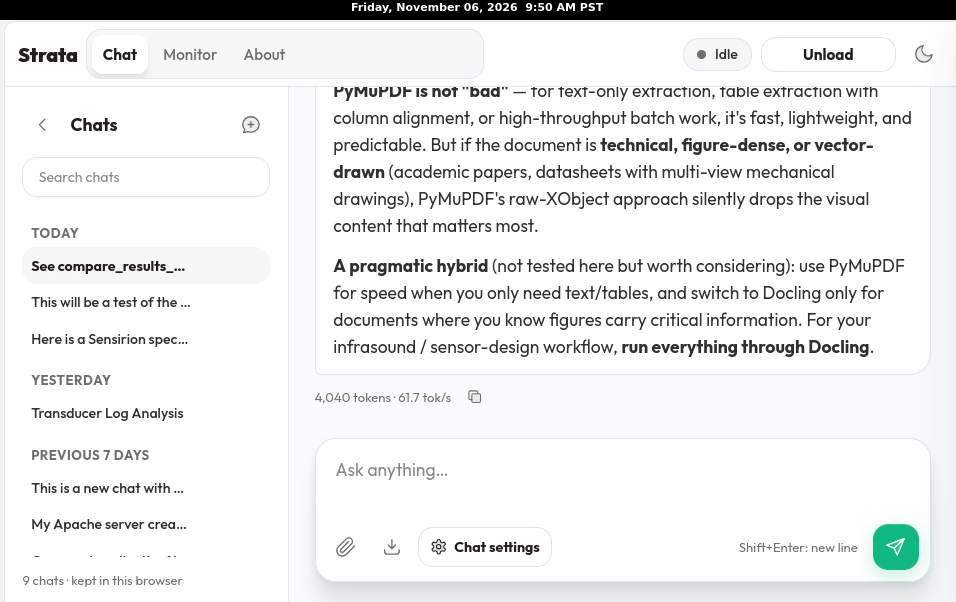
<p>My local AI, the <a href="https://github.com/Niko1221/Strata">Strata</a> project model <strong>qwen3.8-flash-next-iq3_s,</strong> does not accept PDFs for upload.</p>
<img class=" wp-image-1320" src="https://salemdata.net/johnpress/wp-content/uploads/2026/11/20261106_095014_Fri.png" alt="" width="346" height="218" /> Strata Chat Interface
<p>The interface <em>does</em> accept binary images. So if I want my chat to consider the contents of a PDF, I have to extract its text and images and then upload the text and images to my local chat. This study compares two tools that can be used for what I call “digestion” of PDF files: 1) <strong>pymupdf</strong> and 2) <strong>docling</strong></p>
<h1>Methodology</h1>
<p>Since special libraries and AI models are needed, I created separate Python environments so we know what additional packages are needed and what space they consume. When I installed docling, I was surprised — it looks like another AI model is staged for the docling process.</p>
<h2>Libraries</h2>
<p>Installing either library will consume appreciable disk space. Notably, Docling could contribute as much as 9 GB.</p>
<h2>Setting Up the Python Environments</h2>
<h3>pymupdf</h3>
<blockquote>
<pre>jlpoole@ryzdesk ~ $ python3 -m venv ~/venvs/pymu
jlpoole@ryzdesk ~ $ du -s ~/venvs/pymu
13380 /home/jlpoole/venvs/pymu
jlpoole@ryzdesk ~ $ du -sh ~/venvs/pymu
14M /home/jlpoole/venvs/pymu
jlpoole@ryzdesk ~ $
</pre>
</blockquote>
<h3>docling</h3>
<blockquote>
<pre>jlpoole@ryzdesk ~ $ python3 -m venv ~/venvs/docling
jlpoole@ryzdesk ~ $ du -sh ~/venvs/docling/
14M /home/jlpoole/venvs/docling/
jlpoole@ryzdesk ~ $</pre>
</blockquote>
<h3>Updated disk-space accounting</h3>
<table>
<thead>
<tr>
<th>Component</th>
<th>PyMuPDF</th>
<th>Docling</th>
</tr>
</thead>
<tbody>
<tr>
<td>Initial virtual environment</td>
<td>14 MiB</td>
<td>14 MiB</td>
</tr>
<tr>
<td>Installed virtual environment</td>
<td>294 MiB</td>
<td>6.2 GiB</td>
</tr>
<tr>
<td>Increase over baseline</td>
<td>~280 MiB</td>
<td>~6.19 GiB</td>
</tr>
<tr>
<td>Hugging Face model weights</td>
<td>—</td>
<td>506 MiB</td>
</tr>
<tr>
<td>Recently modified pip cache</td>
<td>Not yet apportioned</td>
<td>3,169.61 MiB (shared)</td>
</tr>
</tbody>
</table>
<p>If we provisionally attribute all 3,169.61 MiB of recently modified pip cache files to Docling, the combined footprint would be approximately 9.8 GiB, including the environment growth, model weights, and cached downloads. That figure is an upper-bound-style estimate, not a verified total: some cached packages may belong to PyMuPDF or other pip activity.</p>
<h2>Test PDFs</h2>
<p>I’m using these two PDFs since they contain lots of details in formats other than text that could be relevant to an AI’s analysis.</p>
<ul>
<li>Sensirion specifications for its transducer <a title="https://www.digikey.com/en/products/detail/sensirion-ag/SDP810-125PA/6605488?s=N4IgTCBcDaIMoBEAKAOAjABgLRrAViQEMQBdAXyA" href="https://www.digikey.com/en/products/detail/sensirion-ag/SDP810-125PA/6605488?s=N4IgTCBcDaIMoBEAKAOAjABgLRrAViQEMQBdAXyA" data-from-md="">SDP810-125PA</a></li>
<li>“Implementation, Characterization, and Evaluation of an Inexpensive<br />
Low-Power Low-Noise Infrasound Sensor Based on a Micromachined<br />
Differential Pressure Transducer and a Mechanical Filter” (2012)1</li>
</ul>
<h2>Results</h2>
<h3>Commands</h3>
<p>The command for the pymupdf is this script:</p>
<blockquote>
<pre>import fitz # PyMuPDF
import os
doc = fitz.open("ABC.pdf")
os.makedirs("output_images", exist_ok=True)
# 1. Extract all text
with open("extracted_text.txt", "w", encoding="utf-8") as f:
for page_num in range(len(doc)):
page = doc[page_num]
f.write(f"— Page {page_num + 1} —\n")
f.write(page.get_text())
# 2. Extract all embedded images
image_count = 0
for page_num in range(len(doc)):
page = doc[page_num]
for img_index, img in enumerate(page.get_images(full=True)):
xref = img[0]
base_image = doc.extract_image(xref)
image_bytes = base_image["image"]
image_ext = base_image["ext"]
image_filename = f"output_images/page_{page_num + 1}_img_{image_index}.{image_ext}"
with open(image_filename, "wb") as img_file:
img_file.write(image_bytes)
image_count += 1
print(f"Extracted text to extracted_text.txt and {image_count} images to output_images/")
jlpoole@ryzdesk ~/work/HDC/pdftrial/pymupdf $ cat >install.sh</pre>
</blockquote>
<p>The command for the docling is simply:</p>
<blockquote>
<pre>docling ABC.pdf –to md –image-export-mode referenced –output output_dir/</pre>
</blockquote>
<h3>Extractions Results</h3>
<h4>text extractions</h4>
<h5>pymupdf</h5>
<p>Johnson Study – pymupdf (<a href="https://salemdata.net/dev/wp/pdf_digesters/pymupdf_johnson_extracted_text.txt">text</a>)</p>
<p>Sensirion specification – pymupdf (<a href="https://salemdata.net/dev/wp/pdf_digesters/pymupdf_sensirion_extracted_text.txt">text</a>)</p>
<h5>docling</h5>
<p>Johnson Study – docling (<a href="https://salemdata.net/dev/wp/pdf_digesters/docling_Johnson.md">markdown</a>)</p>
<p>Sensirion specification – docling (<a href="https://salemdata.net/dev/wp/pdf_digesters/docling_sensirion.md">markdown</a>)</p>
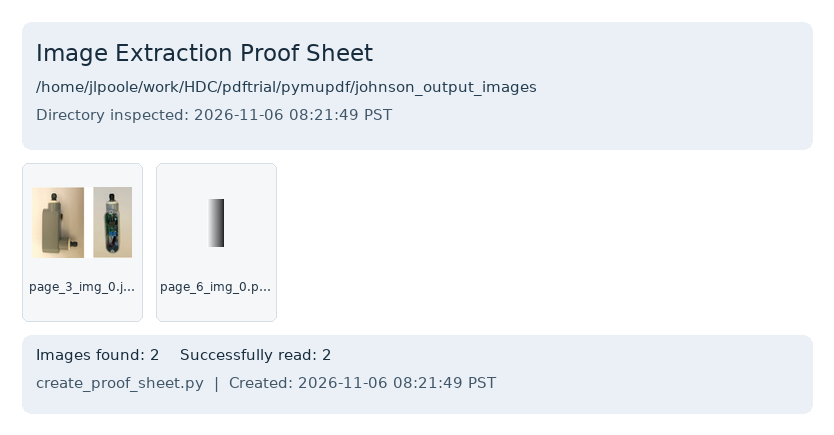
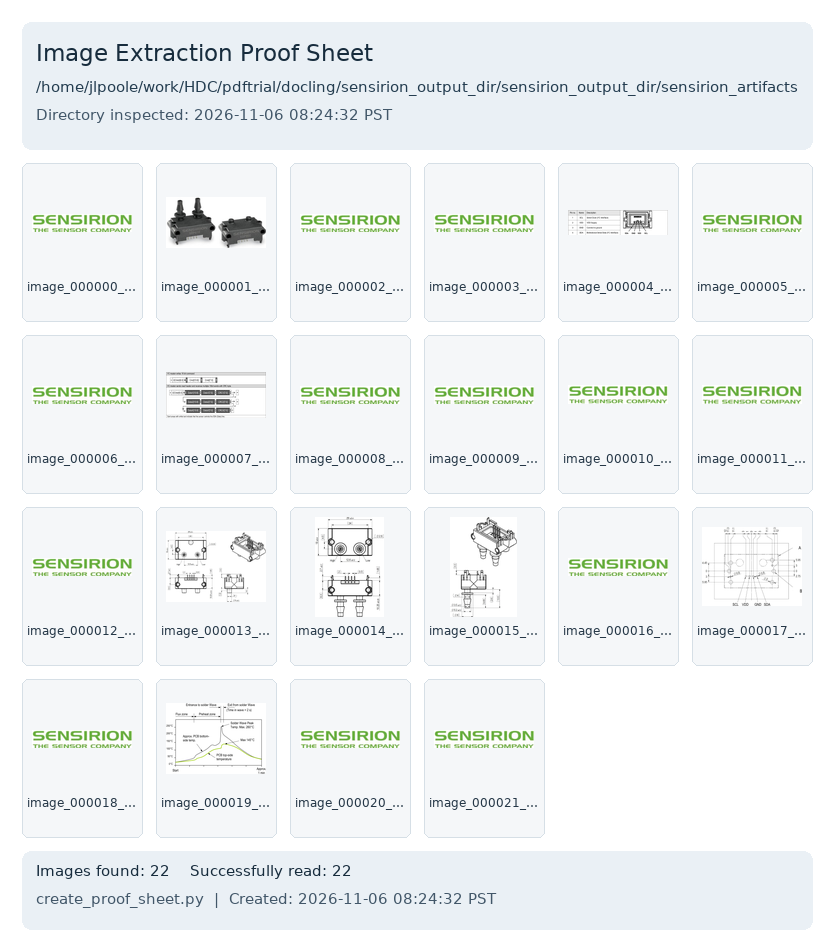
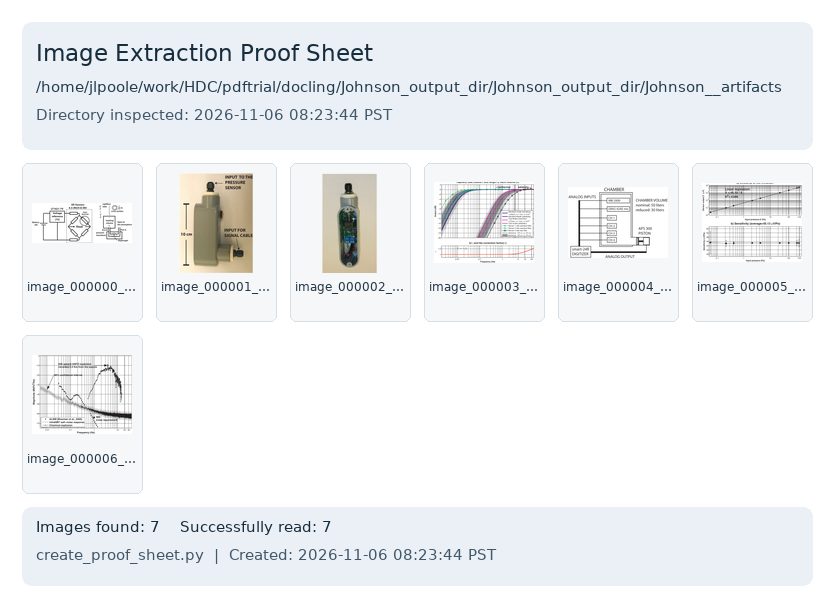
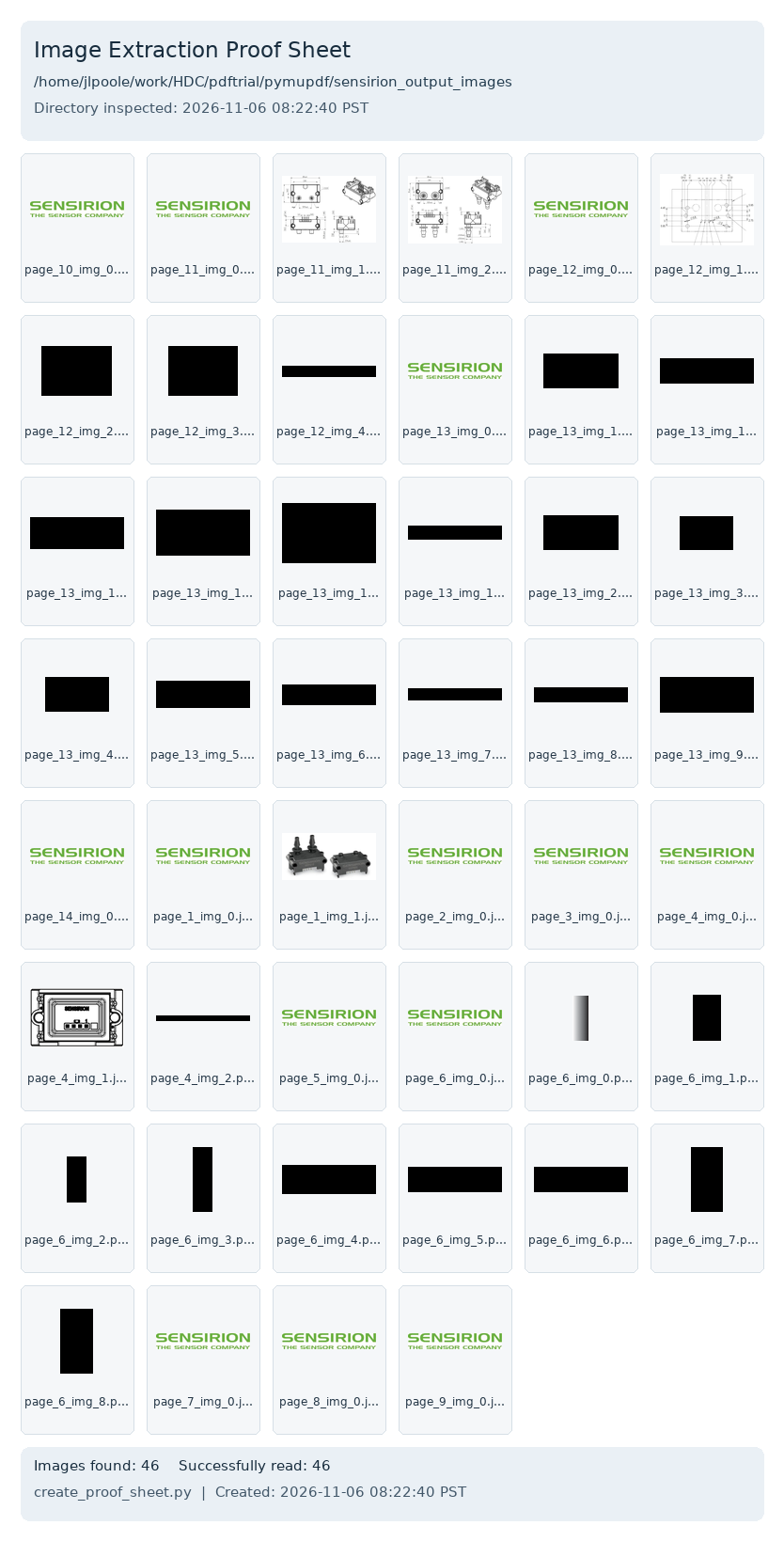
<h4>proof sheets of the image extractions</h4>
<p><</p>
<table>
<tbody>
<tr>
<td></td>
<td><strong>Johnson PDF</strong></td>
<td><strong>Sensirion PDF</strong></td>
</tr>
<tr>
<td><strong>pymupdf</strong></td>
<td>
<p><img class=" wp-image-1314" src="https://salemdata.net/johnpress/wp-content/uploads/2026/11/johnson_output_images_proof_sheet_20261106_082149.png" alt="" width="345" height="180" /> pymupdf Johnson</td>
<td>
<p><img class=" wp-image-1315" src="https://salemdata.net/johnpress/wp-content/uploads/2026/11/sensirion_artifacts_proof_sheet_20261106_082432.png" alt="" width="237" height="270" /> pymupdf Sensirion</td>
</tr>
<tr>
<td><strong>docling</strong></td>
<td>
<p><img class=" wp-image-1316" src="https://salemdata.net/johnpress/wp-content/uploads/2026/11/Johnson__artifacts_proof_sheet_20261106_082344.png" alt="" width="342" height="249" /> docling Johnson</td>
<td>
<p><img class=" wp-image-1313" src="https://salemdata.net/johnpress/wp-content/uploads/2026/11/sensirion_output_images_proof_sheet_20261106_082240.png" alt="" width="328" height="644" /> docling Sensirion</td>
</tr>
</tbody>
</table>
<h3>Local AI Chats Analyses Base On A Particular Extraction</h3>
<p>pymupdf-based chat <a href="https://salemdata.net/dev/wp/pdf_digesters/pymufpdf_strata-chat-2026-11-06-08-49.md">pymufpdf_strata-chat-2026-11-06-08-49.md</a></p>
<p>docling-based chat <a href="https://salemdata.net/dev/wp/pdf_digesters/docling_strata-chat-2026-11-06-09-04.md">docling_strata-chat-2026-11-06-09-04.md</a></p>
<h3>Analysis Of Both Chats</h3>
<p>Local AI Analysis of its pymupdf and docling responses <a href="https://salemdata.net/dev/wp/pdf_digesters/Analysis_of_both_chats_strata-chat-2026-11-06-17-21.md">Analysis_of_both_chats_strata-chat-2026-11-06-17-21.md</a></p>
<h1>Conclusion</h1>
<p>Definitely go with the <strong>docling</strong>. For technical PDFs that contain tables and graphs, you want the benefit of that information being digested for AI.</p>
Introduction
My local AI, the Strata project model qwen3.8-flash-next-iq3_s, does not accept PDFs for upload.
Strata Chat Interface
The interface does accept binary images. So if I want my chat to consider the contents of a PDF, I have to extract its text and images and then upload the text and images to my local chat. This study compares two tools that can be used for what I call “digestion” of PDF files: 1) pymupdf and 2) docling
Methodology
Since special libraries and AI models are needed, I created separate Python environments so we know what additional packages are needed and what space they consume. When I installed docling, I was surprised — it looks like another AI model is staged for the docling process.
Libraries
Installing either library will consume appreciable disk space. Notably, Docling could contribute as much as 9 GB.
If we provisionally attribute all 3,169.61 MiB of recently modified pip cache files to Docling, the combined footprint would be approximately 9.8 GiB, including the environment growth, model weights, and cached downloads. That figure is an upper-bound-style estimate, not a verified total: some cached packages may belong to PyMuPDF or other pip activity.
Test PDFs
I’m using these two PDFs since they contain lots of details in formats other than text that could be relevant to an AI’s analysis.
Sensirion specifications for its transducer SDP810-125PA
“Implementation, Characterization, and Evaluation of an Inexpensive
Low-Power Low-Noise Infrasound Sensor Based on a Micromachined
Differential Pressure Transducer and a Mechanical Filter” (2012)2
Results
Commands
The command for the pymupdf is this script:
import fitz # PyMuPDF
import os

doc = fitz.open("ABC.pdf")
os.makedirs("output_images", exist_ok=True)

# 1. Extract all text
with open("extracted_text.txt", "w", encoding="utf-8") as f:
for page_num in range(len(doc)):
page = doc[page_num]
f.write(f"--- Page {page_num + 1} ---\n")
f.write(page.get_text())

# 2. Extract all embedded images
image_count = 0
for page_num in range(len(doc)):
page = doc[page_num]
for img_index, img in enumerate(page.get_images(full=True)):
xref = img[0]
base_image = doc.extract_image(xref)
image_bytes = base_image["image"]
image_ext = base_image["ext"]
image_filename = f"output_images/page_{page_num + 1}_img_{image_index}.{image_ext}"
with open(image_filename, "wb") as img_file:
img_file.write(image_bytes)
image_count += 1

print(f"Extracted text to extracted_text.txt and {image_count} images to output_images/")
jlpoole@ryzdesk ~/work/HDC/pdftrial/pymupdf $ cat >install.sh
Definitely go with the docling. For technical PDFs that contain tables and graphs, you want the benefit of that information being digested for AI.
</p>
<div id="refs" class="references csl-bib-body hanging-indent" role="list">
<div id="ref-ImplementationCharacterizationandEvaluationofanInexpensiveLowPowerLowNoiseInfrasoundSensorBasedonaMicromachinedDifferentialPressureTransducerandaMechanicalFilter" class="csl-entry" role="listitem">Marcillo, Omar, Jeffrey B. Johnson, and Darren Hart. 2012.<br />
“Implementation, Characterization, and Evaluation of an<br />
Inexpensive Low-Power Low-Noise Infrasound Sensor Based on a<br />
Micromachined Differential Pressure Transducer and a Mechanical<br />
Filter.” <em>Journal of Atmospheric and Oceanic Technology</em><br />
(Boston MA, USA) 29 (9): 1275–84. <a href="https://doi.org/10.1175/JTECH-D-11-00101.1">https://doi.org/10.1175/JTECH-D-11-00101.1</a>.</div>
</div>
<p>
Marcillo, Omar, Jeffrey B. Johnson, and Darren Hart. 2012.
“Implementation, Characterization, and Evaluation of an
Inexpensive Low-Power Low-Noise Infrasound Sensor Based on a
Micromachined Differential Pressure Transducer and a Mechanical
Filter.” Journal of Atmospheric and Oceanic Technology
(Boston MA, USA) 29 (9): 1275–84. https://doi.org/10.1175/JTECH-D-11-00101.1.
Leave a Reply